Cluster Rightsizing
Cluster rightsizing is the process of optimizing node-level resource allocation in a Kubernetes cluster to ensure cost efficiency while maintaining performance. This involves adjusting the type, size, and number of nodes to align with actual workload demand.
In simpler terms, once workload rightsizing is done, you get a clearer picture of how much cluster capacity is actually needed. The next step is ensuring that your nodes are not over-provisioned or underutilized.
Why is it important?
Without cluster rightsizing, even if individual workloads are optimized, you may still have unused capacity sitting idle, leading to wasted cloud spend.
The key reasons why cluster rightsizing matters:
- Reduce Infrastructure Costs: Avoid paying for unused compute by scaling down unnecessary nodes.
- Improve Resource Efficiency: Ensure the right balance between node count and workload demand.
- Optimize Performance & Reliability: Prevent resource starvation while maintaining workload stability.
- Enable Auto-Scaling Decisions: Helps Kubernetes scaling tools (e.g., Cluster Autoscaler, Karpenter) work efficiently.
For example: If a cluster has 5 large nodes but the actual workload requires only 3 nodes, you’re paying for 2 extra nodes unnecessarily. Rightsizing helps eliminate such inefficiencies.
How Workload Rightsizing affects Cluster Rightsizing
Workload and cluster rightsizing are very much interconnected:
- Workload rightsizing focuses on containers, adjusting CPU and memory requests and limits to prevent over- or under-provisioning.
- Cluster rightsizing focuses on nodes, adjusting their count, size, and type based on actual workload consumption.
If workloads are over-provisioned, cluster resources may appear fully utilized, leading to unnecessary node scaling. If workloads are underutilized, the cluster may have more nodes than required, increasing costs.
Therefore, a well-optimized cluster is a result of accurate workload rightsizing.
This is where Randoli helps, by providing granular workload efficiency data, enabling engineers to fine-tune nodes based on real usage trends.
Data-Driven Cluster Rightsizing with Randoli
Effective cluster rightsizing requires a data-driven approach to avoid guesswork and ensure that infrastructure is both cost-efficient and performant.
Randoli provides detailed cost and resource utilization data that helps platform engineers and FinOps teams make informed decisions about node-level optimizations.
Why this data matters:
- Cluster-Wide Cost & Resource Visibility: Get a holistic view of CPU, memory, and node efficiency across the cluster. Helps in identifying underutilized nodes and optimizing capacity planning.
- Node-Level Efficiency Insights: Understand how much of the allocated compute (CPU & memory) is actually being used versus idle. This helps in determining whether nodes can be scaled down or repurposed.
- Reduce Wasted Cloud Spend: Detect and remove idle or underutilized nodes that contribute to unnecessary infrastructure costs.
- Align Workload & Cluster Scaling: Ensures that workload rightsizing at the container level translates into actual cost savings by reducing unnecessary nodes, rather than just reallocating existing resources inefficiently.
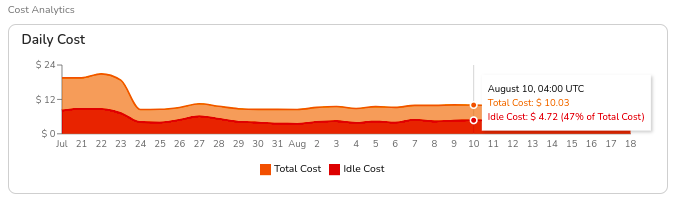
1. Total Daily Cost & Idle Cost Analysis
Helps understand the total cluster cost and identify idle resources that can be optimized.
How Randoli helps
- Displays total cost vs. idle cost in a clear breakdown.
- Shows idle cost as a percentage of total cost, making it easier to identify waste.
Actionable Insight
If idle cost is high, investigate whether excess nodes can be scaled down or if workloads need to be redistributed.
Example
A cluster has a total daily cost of $10.03 on August 10th, but $4.72 (47%) is idle cost. This indicates an opportunity to reduce node count or switch to smaller instance types.
2. Node Count Trends (Spot vs. On-Demand)
Shows whether a cluster is over-provisioned or underutilized.
How Randoli helps
- Provides a historical view of node count, distinguishing between on-demand and spot nodes.
- Helps determine if the cluster is maintaining too many on-demand nodes instead of leveraging cost-efficient spot instances.
Actionable Insight
- If spot node usage is low or zero, consider running a mix of on-demand and spot instances for cost savings.
- If node count remains constant despite workload changes, the autoscaler may not be functioning optimally.
Example
A cluster runs 3 on-demand nodes and 0 spot nodes, despite workloads that could tolerate spot interruptions. Switching 2 of these to spot instances could result in up to 70% cost savings.

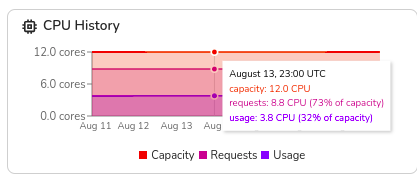
3. CPU & Memory Utilization Trends
Helps determine whether node resources are being fully utilized.
How Randoli helps
- Shows total capacity vs. used CPU & memory over time.
- Highlights cases where nodes are underutilized (leading to waste) or overloaded (risking performance issues).
Actionable Insight
- If CPU/memory usage is consistently below 50%, the node sizes may be too large, and downsizing should be considered.
- If CPU/memory usage frequently spikes close to limits, increasing node size or adding more nodes might be necessary.
Example
A cluster has a total capacity of 12 CPUs but only 3.8 CPUs in use (32% of capacity). This suggests opportunities to consolidate workloads onto fewer nodes, reducing costs.
4. Idle Cost Breakdown by Namespace & Workload
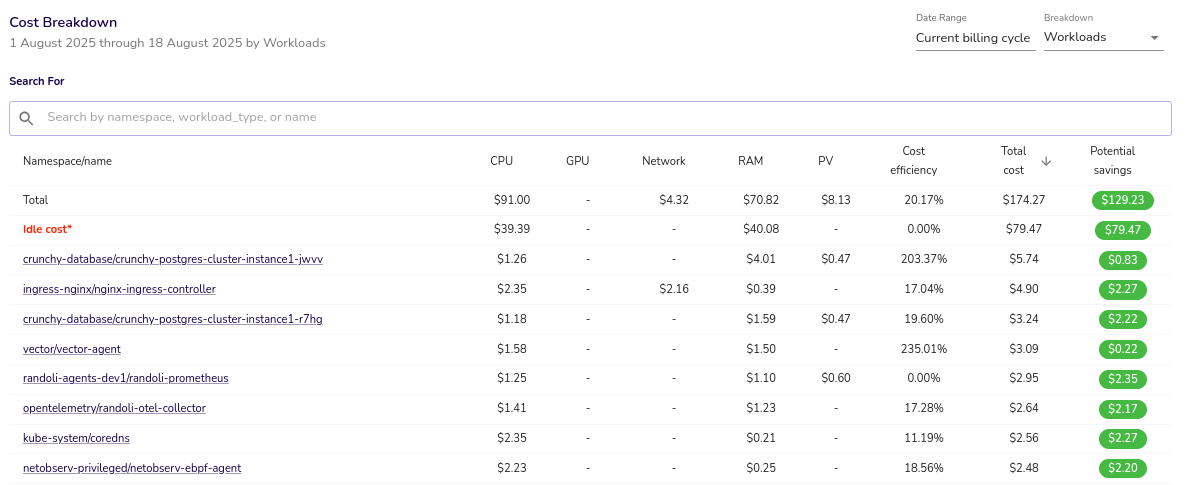
Understanding idle costs at the namespace and workload level helps identify inefficiencies and potential cost savings. High idle costs often indicate over-provisioned or underutilized workloads, leading to unnecessary expenses.
Example
A namespace has an idle cost of $39.39, accounting for 43.3% of the total cluster cost. This suggests opportunities for rightsizing or node consolidation.
For more details on cluster cost breakdown and idle cost analysis, refer to the Cluster Cost Analysis page.
Best Practices
1. Optimize Node Type & Size
Selecting the right node type and size is crucial for balancing cost and performance. General-purpose workloads (e.g., APIs) can run on balanced nodes (AWS T3, GCP n2-standard), while compute-intensive workloads (e.g., AI/ML) benefit from high-CPU nodes (AWS C-series, GCP c2).
For cost efficiency, consider whether running fewer large nodes or more small nodes better fits your workload needs. Larger nodes reduce management overhead but increase failure risk, while smaller nodes improve bin-packing but may increase operational complexity.
2. Use Node Pools for Workload Segmentation
Node pools allow better workload isolation and cost optimization. Critical workloads can be placed on on-demand nodes, while batch jobs and CI/CD workloads can leverage cheaper Spot instances.
Using Taints & Tolerations ensures workloads are scheduled only on designated node types, and Node Affinity rules can distribute workloads efficiently across node pools to avoid overloading specific nodes.
3. Balance On-Demand & Spot Instances
Mixing On-Demand and Spot instances can significantly cut infrastructure costs. Stateless workloads that can tolerate interruptions (e.g., batch processing, CI/CD pipelines) are ideal candidates for Spot instances, reducing costs by up to 70-90%.
For example, replacing two On-Demand nodes with Spot nodes can yield cost savings while maintaining resilience. Tools like Karpenter can dynamically swap underutilized On-Demand nodes with cost-efficient Spot alternatives.
4. Leverage Autoscalers for Dynamic Rightsizing
Manual node scaling is inefficient at scale. Kubernetes-native tools like Cluster Autoscaler and Karpenter help optimize cluster size dynamically.
Cluster Autoscaler adjusts node count based on pod demand, while Karpenter provides faster, cost-aware scaling by selecting optimal node types and aggressively terminating underutilized nodes. Using HPA (Horizontal Pod Autoscaler) and VPA (Vertical Pod Autoscaler) alongside these can further optimize workload resource allocation.
While HPA and VPA can both improve resource allocation, they are not typically used together as they may conflict when scaling based on the same metrics. Before implementing both, it's important to understand their differences and potential interactions.
For a detailed guide on when and how to use VPA effectively, check out the guide to Kubernetes VPA.
5. Continuously Monitor Idle Cost & Usage Trends
Regular monitoring ensures that rightsizing efforts remain effective over time. Randoli provides cost breakdowns to highlight underutilized resources and identify idle nodes that can be removed.
If a cluster has consistently high idle costs (e.g., 30%+ for weeks) or low CPU/memory usage, downsizing nodes or adjusting scaling policies can improve efficiency. Regularly reassessing infrastructure needs ensures clusters remain optimized as workload demands evolve.
Conclusion
Cluster rightsizing is a crucial step in optimizing Kubernetes infrastructure costs while maintaining performance. By analyzing workload efficiency, identifying idle resources, and making data-driven scaling decisions, teams can ensure that clusters are neither over-provisioned nor underutilized.
Randoli provides the necessary visibility into cluster-wide cost trends, node utilization, and idle costs, enabling platform engineers and FinOps teams to make informed decisions about scaling nodes, optimizing instance types, and balancing workload distribution.
By continuously monitoring and refining resource allocations, organizations can reduce unnecessary cloud spend, improve resource efficiency, and maintain workload reliability without compromising performance.